
Why does the homepage appear when an Author clicks the Posts menu?
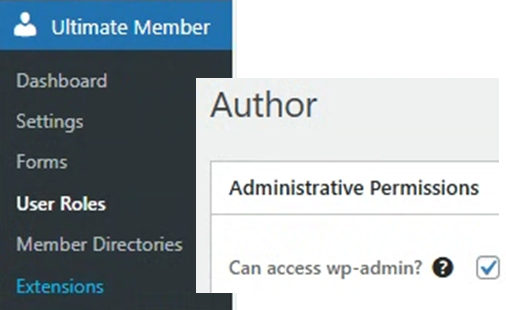
This is a classic WordPress problem, and it’s not the default behavior. When an Author user clicks the “Posts” menu, they should be taken to the wp-admin/edit.php screen (the list of their posts).
If they are being sent to the homepage, it means something on your site is incorrectly redirecting them.
Here are the most common causes, from most likely to least likely:
1. An SEO Plugin (Most Likely Cause)
SEO plugins like Yoast SEO or Rank Math have a feature to “disable author archives.”
- Why? On a single-author blog, the “author archive” page (a page listing all posts by that author) is identical to the homepage. This creates “duplicate content,” which can be bad for SEO.
- The Problem: The plugin “fixes” this by redirecting all author-related pages to the homepage. This can sometimes be too aggressive and accidentally include the admin “Posts” link, which it mistakes for a link to the author’s public archive.
How to Fix:
- For Yoast SEO: Go to Yoast SEO > Settings > Advanced > Author Archives. Make sure the “Enable author archives” toggle is ON.
- For Rank Math: Go to Rank Math > Titles & Meta > Authors. Make sure “Author Archives” is Enabled.
2. A Membership or Security Plugin
Plugins that manage user access are the next most likely cause.
- Membership Plugins (like Ultimate Member, MemberPress, etc.): These plugins are designed to keep non-admins out of the dashboard. They have settings that “Redirect all non-admins to the homepage” after login. This setting is likely interfering with all dashboard links.
- Security Plugins (like Wordfence, iThemes Security): These may have a setting to “Block non-admins from wp-admin,” which can cause this redirect.
How to Fix: Look in that plugin’s settings for any “Login Redirect” or “Dashboard Access” rules. You will need to either disable the redirect for the “Author” role or specifically allow authors to access the wp-admin area.
3. A Custom Code Snippet
Someone may have added code to your theme’s functions.php file to intentionally redirect users. This code often looks something like this:
// This code is an EXAMPLE of the problem
add_action( 'admin_init', 'redirect_non_admins' );
function redirect_non_admins() {
    if ( ! current_user_can( 'administrator' ) ) {
        wp_redirect( home_url() );
        exit;
    }
}
This code checks if the user is not an administrator and, if so, sends them to the homepage. This would block authors, editors, and all other roles from the dashboard.
How to Fix: As an administrator, go to Appearance > Theme File Editor > functions.php and look for any code related to wp_redirect or admin_init that mentions user roles. Be very careful editing this file, as a mistake can break your site.
4. Corrupted .htaccess File or Permalink Issue
Sometimes, the file that controls your site’s URL structure (permalinks) can become corrupted. An easy fix is to “flush” or reset them.
How to Fix:
- As an Admin, go to Settings > Permalinks.
- Don’t change any settings.
- Simply click the “Save Changes” button at the bottom.
This simple action forces WordPress to rebuild the .htaccess file and can fix many strange redirect issues.