
DevOps in Software Development
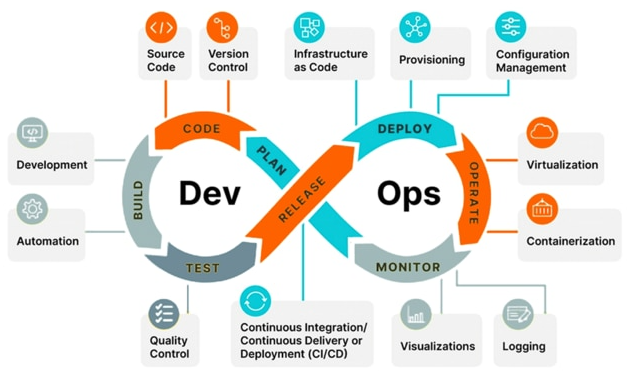
In simple terms, DevOps is a cultural and technical bridge that closes the gap between the people who write the code (Dev) and the people who keep the servers running (Ops). Instead of a “hand-off” where developers throw code over a wall to operators, DevOps creates a continuous loop of collaboration, automation, and feedback.
Contents
- The DevOps Lifecycle (The Infinite Loop)
- Planning steps
- CI/CD Pipeline
- Waterfall (Old Way) Vs DevOps
- Sprint
- Backlog
- Definition of Done (DOD)
The DevOps Lifecycle (The Infinite Loop)
The procedure is often visualized as an infinity symbol because the process never truly ends; it constantly cycles through these phases:
1. Plan & Code (Development Phase)
- Plan: Teams define the business requirements, user feedback, and security needs.
- Code: Developers write code and use Version Control Systems (like Git) to manage changes and collaborate.
2. Build & Test (Continuous Integration – CI)
- Build: As soon as code is pushed, an automated system compiles it into an executable artifact.
- Test: Automated tests (unit, integration, and security) run immediately. If a bug is found, the developer is notified instantly so they can fix it while the context is still fresh.
3. Release & Deploy (Continuous Delivery/Deployment – CD)
- Release: Once the build passes all tests, it’s ready for production.
- Deploy: The software is automatically (or with one-click approval) moved to the production environment. This is often done using Infrastructure as Code (IaC) to ensure the server environment is identical every time.
4. Operate & Monitor (Operations Phase)
- Operate: The app is live. Scaling, patching, and security management happen here.
- Monitor: Systems collect data on performance, errors, and user behavior. This data is fed back into the Plan phase, starting the loop over again.
Core Pillars of the Procedure
To make this loop work, DevOps relies on several “golden rules”:
| Pillar | Description |
| Automation | If a task is repetitive (like testing or deploying), it should be scripted. This reduces human error. |
| Collaboration | Developers and Ops share the same goals and KPIs (Key Performance Indicators) instead of working in silos. |
| Microservices | Breaking large apps into small, independent pieces so that a failure in one part doesn’t crash the whole system. |
| Fail Fast | It’s better to find a bug 5 minutes after coding it than 5 weeks later in front of a customer. |
The “Shift Left” Mentality
A major part of the modern DevOps procedure is Shifting Left. This means moving security and testing to the earliest possible stage of development (the “left” side of the timeline) rather than leaving them for the end.
Planning Steps
In the Plan stage of DevOps, the goal is to define what we are building and why, ensuring the team doesn’t waste time writing code that doesn’t provide value.
It is a highly collaborative phase involving Product Managers, Developers, and Operations. Here are the specific steps:
1. Ideation and Requirements Gathering
Everything starts with a business need or a user problem.
- The Action: Stakeholders define the high-level features or fixes needed.
- The Document: Product Requirement Document (PRD) or a set of Epics (large chunks of work).
- DevOps Twist: We also plan for “Non-functional requirements” here, like “The site must handle 10,000 users at once” (Scalability).
2. Backlog Refinement (Grooming)
The “Product Backlog” is a long list of everything we could do. Refinement makes it actionable.
- The Action: Breaking “Epics” into small, bite-sized User Stories.
- The Goal: Ensure every task is “Ready”—meaning it has clear acceptance criteria so a developer knows exactly when it’s “Done.”
3. Prioritization
You can’t do everything at once.
- The Action: The Product Owner ranks the backlog based on business value, risk, and urgency.
- Technique: Many teams use MoSCoW (Must-have, Should-have, Could-have, Won’t-have) or simple numerical ranking.
4. Estimation
The engineers look at the tasks and estimate the effort required.
- The Action: Instead of hours, teams often use Story Points (based on complexity).
- The Goal: To understand the team’s “Capacity”—how much work they can realistically finish in one sprint.
5. Sprint Planning
This is the final “pre-game” huddle before coding starts.
- The Action: The team commits to a specific set of stories for the next 1–4 weeks.
- The Output: The Sprint Backlog. This is the “Contract” for the next cycle.
6. Infrastructure & Security Planning (Shift Left)
This is what makes it DevOps rather than just “Agile.”
- The Action: * Ops plans the environment (e.g., “We need a new S3 bucket for this feature”).
- Security defines the “Guardrails” (e.g., “The API must use OAuth2”).
- The Benefit: By planning the “Ops” side now, you avoid the “It worked on my machine but the server crashed” disaster later.
Summary of Planning Tools & Artifacts
| Element | Tool Example | Resulting Document/Artifact |
| Strategy | Confluence, Notion | Roadmap / Architecture Diagram |
| Task Management | Jira, Trello, Azure Boards | User Stories / Sprint Backlog |
| Communication | Slack, Microsoft Teams | Meeting Minutes / Decisions |
| Measurement | Burn-down Charts | Predicted Velocity |
Key takeaway: In DevOps, planning is not a one-time event (like Waterfall). It happens every few weeks so the team can adjust to feedback immediately.
CI/CD Pipeline
To understand a CI/CD Pipeline, it helps to think of it as a factory assembly line. Each time you “push” code, the assembly line starts moving, checking every nut and bolt before the product reaches the customer.
Let’s walk through a specific example: A Node.js Web App being deployed to GitHub Pages (or a server) using GitHub Actions.
The Workflow Scenario
Imagine you are building a simple website. You want two things to happen automatically every time you update your code:
- CI (Continuous Integration): Verify the code isn’t broken (Run tests).
- CD (Continuous Deployment): If tests pass, put the website online.
Step 1: The Trigger
You finish your code and run the following command in your terminal:
git add .
git commit -m "Add new login feature"
git push origin mainThis “Push” event tells GitHub, “Hey, something changed! Start the pipeline.”
Step 2: The Workflow File (.github/workflows/main.yml)
GitHub looks for a specific YAML file in your repository. This file is the instruction manual for the robot.
name: My Web App CI/CD

on:
  push:
    branches: [ main ]  # Run this whenever code is pushed to 'main'

jobs:
  build-and-test:
    runs-on: ubuntu-latest  # The robot wakes up in a fresh Linux environment

    steps:
    - name: Checkout code
      uses: actions/checkout@v4  # The robot "downloads" your code

    - name: Install Node.js
      uses: actions/setup-node@v4
      with:
        node-version: '20'

    - name: Install dependencies
      run: npm install  # Robot installs your libraries

    - name: Run Tests
      run: npm test     # THE GATEKEEPER: If this fails, the pipeline stops here!

  deploy:
    needs: build-and-test # Only run this if the tests passed!
    runs-on: ubuntu-latest
    steps:
    - name: Deploy to Hosting
      run: |
        echo "Deploying to production server..."
# Commands to upload files to AWS, Firebase, or Vercel go hereStep 3: The Execution (The “Magic” Part)
Once the file is detected, GitHub Actions provides a visual dashboard:
- Spinning Up: A virtual machine (Runner) starts in the cloud.
- Lint & Test: The robot runs
npm test.- If it fails: You get an Email/Red X. The bad code never reaches your users.
- If it passes: You get a Green Checkmark.
- Deployment: The robot takes the “Build” (the optimized version of your site) and pushes it to your web host (like AWS or Vercel).
Why is this better than the “Old Way”?
| Feature | The Old Way (Manual) | The DevOps Way (CI/CD) |
| Testing | “I forgot to run the tests.” | Mandatory. Code can’t merge if tests fail. |
| Speed | 30 mins to manually upload files. | Seconds. Happens in the background. |
| Consistency | “It worked on my laptop!” | “It worked in the standard runner.” |
| Recovery | Stressful manual rollback. | Revert the Git commit; the pipeline redeploys. |
Summary of the “Chain”
Code Push Trigger Action Provision Runner Install & Build Test Deploy
Waterfall (Old Way) Vs DevOps
In many ways, yes. When DevOps practitioners talk about the “old way,” they are usually referring to the Waterfall model or its cousin, the Siloed model.
The primary difference lies in how they handle risk and speed.
Waterfall vs. DevOps: The Fundamental Shift
The Waterfall Way (Sequential)
In Waterfall, software development is a one-way street. You finish one giant phase before moving to the next.
- The Problem: Testing and “Ops” (Deployment) happen at the very end. If a developer writes a bug in Month 1, but the “Verification” phase doesn’t happen until Month 6, it is incredibly expensive and difficult to fix.
- The Hand-off: Developers finish the code and “throw it over the wall” to the Operations team. If the code doesn’t work on the server, the Ops team blames the Devs, and the Devs blame the Ops environment.
The DevOps Way (Iterative & Continuous)
DevOps breaks that giant “Waterfall” into hundreds of tiny “Waterfalls” that happen every single day.
- Continuous Feedback: Instead of waiting 6 months to see if the code works on a server, you find out in 6 minutes via your CI/CD pipeline.
- Shared Responsibility: There is no “wall.” Developers and Operations work together from the Plan stage to ensure the code is “production-ready” from day one.
Side-by-Side Comparison
| Feature | Waterfall (Old Way) | DevOps (New Way) |
| Release Frequency | Once every 6–12 months. | Multiple times per day/week. |
| Testing | A dedicated phase at the end. | Continuous and automated at every step. |
| Risk | High (Big Bang release). | Low (Small, incremental changes). |
| Documentation | Heavy, upfront requirements. | Living documentation and code-as-docs. |
| Team Structure | Siloed (Devs vs. QA vs. Ops). | Cross-functional (Everyone owns the app). |
Is Waterfall ever “right”?
While DevOps is the standard for web apps (like WordPress, Facebook, or SaaS tools), Waterfall is still sometimes used in industries where:
- Change is impossible: Like building a physical bridge or hardware that cannot be updated via the internet.
- Strict Regulation: Where every single requirement must be signed off by a government agency before building starts.
However, for 99% of software, DevOps is the evolution that solved the “Waterfall bottleneck.”
Sprint
In the world of DevOps and Agile, a Sprint is a short, time-boxed period (usually 1 to 4 weeks) during which a team works to complete a specific set of tasks from their backlog.
Think of it as a mini-project with a clear start and finish line.
The Sprint Lifecycle
- Sprint Planning: The team picks the most important tasks from the “Product Backlog” and moves them into the “Sprint Backlog.”
- The Work: Developers code, testers test, and the CI/CD pipeline runs continuously.
- Daily Stand-up: A quick (15-min) meeting to discuss:
- What did I do yesterday?
- What will I do today?
- Is anything blocking me?
- Sprint Review: A demo where the team shows the finished work to stakeholders.
- Sprint Retrospective: The team discusses what went well and what could be improved for the next sprint.
Why use Sprints?
- Predictability: You know exactly when the next update is coming.
- Flexibility: If requirements change, you only have to wait until the next sprint (max a few weeks) to pivot.
- Motivation: Finishing a sprint provides a sense of accomplishment and a “clean slate” for the next one.
Summary Table
| Feature | Sprint Detail |
| Duration | Fixed (usually 2 weeks). |
| Goal | To deliver a “Potentially Shippable” product increment. |
| Commitment | Once the sprint starts, no new tasks should be added to it. |
Backlog
A Backlog is essentially a prioritized “To-Do” list of every feature, bug fix, and technical task required to build and maintain a product.
Here is the breakdown:
- The Content: It contains User Stories (features), Bugs (fixes), and Technical Debt (backend improvements).
- The Order: It is never random. The most valuable or urgent items sit at the top, while vague, future ideas stay at the bottom.
- The Evolution: It is a “living document.” As the market changes or users give feedback, the backlog is constantly re-ordered (Groomed).
- The Purpose: It acts as the “Single Source of Truth.” If a task isn’t in the backlog, the team doesn’t work on it.
Two Types of Backlogs:
- Product Backlog: The “Master List” for the entire project’s future.
- Sprint Backlog: A small subset of items pulled from the Product Backlog to be completed in the current Sprint (the next 1–4 weeks).
A Typical Example of a backlog item for a WordPress-related Project
User Story: Password Reset Feature
- ID: DEV-102
- Priority: High
- Estimate: 5 Story Points
1. The Story Statement
“As a Registered User, I want to reset my password via email so that I can regain access to my account if I forget my credentials.“
2. Acceptance Criteria (AC)
These are the “Checklists” the code must pass. In DevOps, these often become the basis for automated tests.
- [ ] There is a “Forgot Password” link on the login page.
- [ ] Clicking the link triggers an email to the user’s registered address.
- [ ] The email contains a secure, one-time-use link valid for 24 hours.
- [ ] The user can set a new password that meets the minimum 8-character requirement.
- [ ] The system logs the password change event for security auditing.
3. Technical Notes (The “Ops” part)
- Service: Requires integration with the SendGrid API (SMTP).
- Security: Ensure the reset token is hashed in the database.
Definition of Done (DoD)
The Definition of Done (DoD) is a shared checklist of technical and quality standards that every task must meet before it can be considered truly “finished.” While a User Story tells you what to build, the DoD tells you the quality it must reach.
Key Components of a Typical DoD
- Code Quality: Code is peer-reviewed and merged into the main branch.
- Testing: All automated unit tests pass (100% success rate).
- Documentation: README or API docs are updated.
- Environment: The feature works in the “Staging” or “QA” environment.
- Security: No high-priority vulnerabilities found in automated scans.
Why it Matters
- No Assumptions: It prevents a developer from saying “I’m done” when the code is written but not yet tested.
- Consistency: Every feature meets the same high bar, regardless of who wrote it.
- Transparency: Stakeholders know that “Done” means “Ready for Production,” not “Ready for more work.”
The Simple Rule: If a task doesn’t meet all the criteria in the DoD, it stays in the “In Progress” column and cannot be counted toward the sprint goal.