Slug Uniqueness in WordPress: Problem Solving
The Slug Uniqueness
- In WordPress’s data structure, a single slug must correspond to only one term_id.
- Slugs and names for pages, posts, forums, topics, and code‑snippet types must be unique.
Grouped-Slug Count in “wp_terms” Table
SELECT slug, COUNT(*)
FROM wp_terms
GROUP BY slug
HAVING COUNT(*) > 1;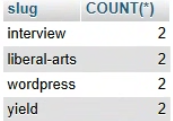
If you group by slug and the count is 2 or more, it means different term_id values exist that share the same slug.
Slug “term_id“ in “wp_terms“
SELECT term_id, name, slug
FROM wp_terms
WHERE name IN ('interview', 'liberal-arts', 'wordpress', 'yield');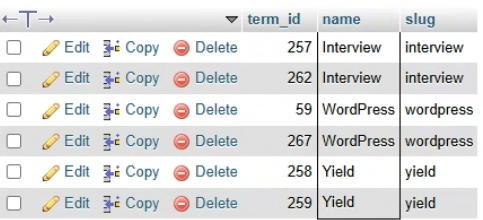
The ‘interview’ slug is duplicated under term_id 257 and 262, ‘wordpress’ is duplicated under 59 and 267, and ‘yield’ is duplicated under 258 and 259.
The reason the ‘liberal-arts’ slug does not appear is that the search was performed only on wp_terms, so the search needs to be expanded to additional tables.
Duplicated Slug Locations
-- 1. 분류 항목(Terms) 조회
SELECT
  t.slug,
  t.term_id AS id_or_postid,
  tt.taxonomy AS type,
  tt.count AS count_or_status
FROM wp_terms t
INNER JOIN wp_term_taxonomy tt ON t.term_id = tt.term_id
WHERE t.slug IN ('interview', 'liberal-arts', 'wordpress', 'yield')

UNION ALL

-- 2. 페이지 및 포스트(Posts) 조회
SELECT
  post_name AS slug,
  ID AS id_or_postid,
  post_type AS type,
  post_status AS count_or_status
FROM wp_posts
WHERE post_name IN ('interview', 'liberal-arts', 'wordpress', 'yield')
AND post_status NOT IN ('inherit', 'trash') -- 자동 저장 및 휴지통 제외

ORDER BY slug ASC;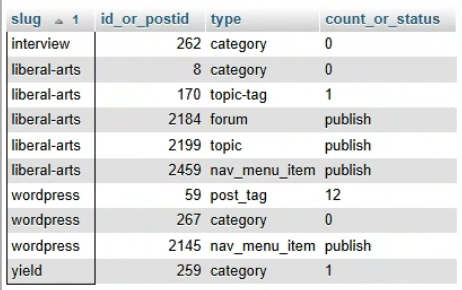
+ Page slug collisions do not occur because the permalink structure (/%postname%-%post_id%/) includes the page ID, preventing duplicates.
Page and Post Titles
SELECT
  t.term_id,
  t.slug,
  tt.term_taxonomy_id,
  tt.taxonomy,
  p.ID AS post_id,
  p.post_title,
  p.post_type,
  p.post_status
FROM wp_terms t
INNER JOIN wp_term_taxonomy tt ON t.term_id = tt.term_id
INNER JOIN wp_term_relationships tr ON tt.term_taxonomy_id = tr.term_taxonomy_id
INNER JOIN wp_posts p ON tr.object_id = p.ID
WHERE t.term_id IN (262, 170, 8, 267, 59, 259, 257)
ORDER BY t.term_id, p.post_date DESC;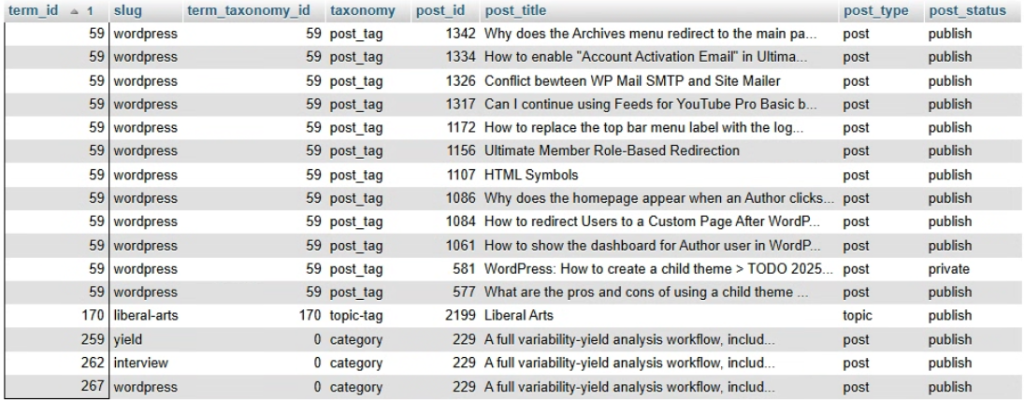
- WordPress (ID 59): This term is correctly linked as a post_tag to 12 posts (IDs 1342, 1334, etc.). It is the most actively used data.
- Liberal Arts (ID 170): This term is linked as a topic-tag to one post (ID 2199).
- Error Data (ID 259, 262, 267): These three IDs have invalid taxonomy information (their term_taxonomy_id is 0). If you only modify the terms or taxonomy without deleting the relationships linked to ID 0, you’ll encounter a ‘zombie’ issue. If a new category is accidentally assigned the ID 0, it will automatically reconnect to your old posts (like Post 229), causing ghost relationships to reappear
Problem Solving
You must first break the abnormal connections in wp_term_relationships, and then delete the ghost entries.
Step 1: Delete Abnormal Post Connections
- Remove the incorrect category relationships for yield, interview, and WordPress that are erroneously linked to Post ID 229.
- Specifically, target the relationships associated with IDs 259, 262, and 267.
DELETE FROM wp_term_relationships
WHERE object_id = 229 AND term_taxonomy_id IN (
   SELECT term_taxonomy_id FROM wp_term_taxonomy WHERE term_id IN (259, 262, 267)
);Step 2: Delete Ghost Categories and Tags
- Delete the IDs where the data is corrupted or where the post_count appears to be 0 in the database.
- Target IDs include 8, 262, and 267.
- Note: ID 259 (yield) is to be used as a category.
-- 1. Taxonomy 관계 삭제
DELETE FROM wp_term_taxonomy WHERE term_id IN (8, 262, 267);

-- 2. Term 정보 삭제
DELETE FROM wp_terms WHERE term_id IN (8, 262, 267);Step 3: Delete Isolated Ghost Entries with Missing Taxonomy
- Clean up “residue” data like ID 257, which exists in the wp_terms table but has no corresponding entry in wp_term_taxonomy.
- This step ensures the removal of orphaned terms that no longer have a defined purpose (category, tag, etc.) in the system
3.1 NOT IN Method
This query identifies all “ghost” categories that exist in the wp_terms table but are not appearing on the dashboard due to broken links with wp_term_taxonomy.
DELETE FROM wp_terms
WHERE term_id NOT IN (SELECT term_id FROM wp_term_taxonomy);When processing a NOT IN clause, the database engine may be inefficient because it must internally scan every value in the subquery first. Furthermore, if the term_id column in the wp_term_taxonomy table contains even a single NULL value, the NOT IN condition may return an empty result, failing to delete or identify anything at all due to SQL’s three-valued logic.
3.2 LEFT JOIN … IS NULL Method
To avoid the issues mentioned above, using a LEFT JOIN is the industry standard for performance and reliability.
DELETE FROM wp_terms
WHERE term_id IN (
    SELECT t.term_id FROM wp_terms t LEFT JOIN wp_term_taxonomy tt ON t.term_id = tt.term_id
    WHERE tt.term_id IS NULL
);You can check the ghost category IDs in advance using the query below.
SELECT t.term_id, t.name, t.slug
FROM wp_terms t
LEFT JOIN wp_term_taxonomy tt ON t.term_id = tt.term_id
WHERE tt.term_id IS NULL;Step 4: Permalink Update
Go to WordPress Admin > Settings > Permalinks and click [Save Changes] at the bottom (click the button without making any modifications). This will rebuild the slug rules.
Check
SELECT 'wp_terms' AS table_name, term_id, COUNT(*) AS duplicate_count FROM wp_terms
    GROUP BY term_id HAVING COUNT(*) > 1

UNION ALL

SELECT 'wp_term_taxonomy' AS table_name, term_id, COUNT(*) AS duplicate_count FROM wp_term_taxonomy
    GROUP BY term_id HAVING COUNT(*) > 1;
Hedge
📍Integrated Integrity Check
- Database integrity should be checked periodically.
/* 1. wp_terms 테이블 내 슬러그 중복 확인 */
SELECT 'Duplicate Slug' AS Issue, slug, COUNT(*) AS Count
FROM wp_terms
GROUP BY slug
HAVING COUNT(*) > 1

UNION ALL

/* 2. wp_terms 테이블 내 term_id 중복 확인 */
SELECT 'Duplicate Term ID (Terms)' AS Issue, term_id, COUNT(*) AS Count
FROM wp_terms
GROUP BY term_id
HAVING COUNT(*) > 1

UNION ALL

/* 3. wp_term_taxonomy 테이블 내 term_id 중복 확인 */
SELECT 'Duplicate Term ID (Taxonomy)' AS Issue, term_id, COUNT(*) AS Count
FROM wp_term_taxonomy
GROUP BY term_id
HAVING COUNT(*) > 1

UNION ALL

/* 4. 관계가 끊긴 유령 데이터 확인 (wp_term_taxonomy에 없는 terms) */
SELECT 'Orphaned Term (No Taxonomy)' AS Issue, term_id, slug AS Count
FROM wp_terms
WHERE term_id NOT IN (SELECT term_id FROM wp_term_taxonomy);
🚀Unique Index
- If the integrity check returns zero results (Empty set), you can safely enforce permanent protection against slug duplication.
- Adding a unique index to wp_terms prevents slug duplication at the database level and improves searching performance.
- A successful execution of this command indicates that the current table contains no duplicate slugs whatsoever.
/* 슬러그 중복 방지 인덱스 추가 */
ALTER TABLE wp_terms ADD UNIQUE INDEX idx_unique_slug (slug);

/* term_id 중복 방지 인덱스 추가 (이미 기본키가 있다면 생략 가능) */
/* 보통 term_id는 PRIMARY KEY로 설정되어 있으나, 만약 없다면 추가 권장 */
Precheck SQL
This is an integrated pre-check code to simultaneously verify if the slug ‘yield’ is already in use within both the Categories (Terms) table and the Posts table before adding it as a new category.
/* 1. 변수 선언 */
SET @target_slug = 'yield';

/* 2. 통합 조회 실행 (COLLATE 추가) */
SELECT 'Term (Category/Tag)' AS Source, term_id AS ID, name AS Title, slug AS Slug_Name
FROM wp_terms
WHERE slug COLLATE utf8mb4_unicode_ci = @target_slug

UNION ALL

SELECT 'Post (Page/Post/Menu)' AS Source, ID, post_title AS Title, post_name AS Slug_Name
FROM wp_posts
WHERE post_name COLLATE utf8mb4_unicode_ci = @target_slug;
Appendix
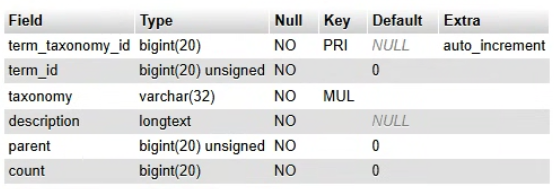
DESC wp_terms;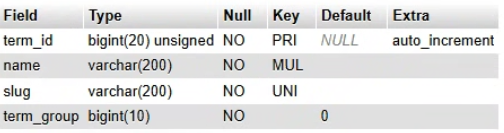
PRI: Primary Key, UNI: Unique Key, MUL: Multiple Key
DESC wp_term_taxonomy;