
Why does the Archives menu redirect to the main page in WordPress?
This is a very common issue, and it’s almost always caused by an SEO plugin or a theme setting that is trying to prevent “duplicate content.”
Here’s a breakdown of what’s happening and how to fix it.
The “Why”: Preventing Duplicate Content
Your “main page” (the blog) shows a list of all your posts. An “archive” page (like a date archive for “November 2025” or an author archive for “admin”) also shows a list of posts.
SEO plugins see this as “duplicate content,” which they believe can hurt your Google ranking. To “fix” this, they automatically redirect these “unnecessary” archive pages to your homepage.
The most common archive to be redirected is the Author Archive, especially if you are the only author on your site.
How to Fix It (From Most Likely to Least Likely)
1. Check Your SEO Plugin Settings (Most Likely)
This is the #1 cause. You need to find the setting that is disabling your archives.
- If you use Yoast SEO:
- Go to Yoast SEO > Settings > Advanced.
- Click on Author Archives.
- Make sure the “Enable author archives” toggle is ON.
- Do the same for Date Archives if they are also redirecting.
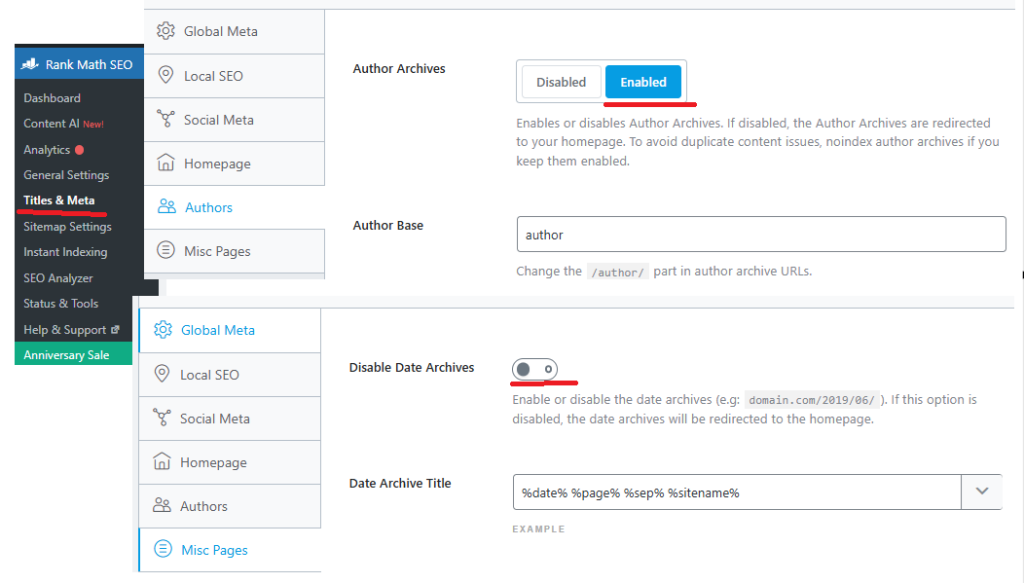
- If you use Rank Math:
- Go to Rank Math > Titles & Meta.
- Click on Authors. Make sure the “Author Archives” setting is Enabled.
- Do the same for Date Archives under the “Misc Pages” tab.
- If you use All in One SEO:
- Go to AIOSEO > Search Appearance.
- Click the “Archives” tab.
- Find Author Archives and make sure it is Enabled.
2. Reset Your Permalinks (The Classic Fix)
This is the easiest and safest “reset” for your WordPress URL structure.
- Go to Settings > Permalinks.
- Do not change any settings.
- Scroll to the bottom and click the “Save Changes” button.
This simple action forces WordPress to rebuild its URL rules and can fix many strange redirect problems.
3. Check Kadence Theme Settings
Kadence gives you control over this as well.
- Go to Appearance > Customize.
- Go to Posts/Pages Layout > Archive Layout.
- Look through the settings to make sure there isn’t a “redirect” option turned on. (This is less likely than the SEO plugin, but possible).
4. Check for a Redirect Plugin
If you have a plugin installed called “Redirection” or “301 Redirects,” you may have accidentally created a “broad” rule that is sending all archive pages to your homepage. Check the rules in that plugin.